
New Ram Sai — Full-Stack QR Menu App
Production hospitality PWA — 200+ dishes, search, cart, item sheets, table QR modes, and Cloud Run deploy


Overview
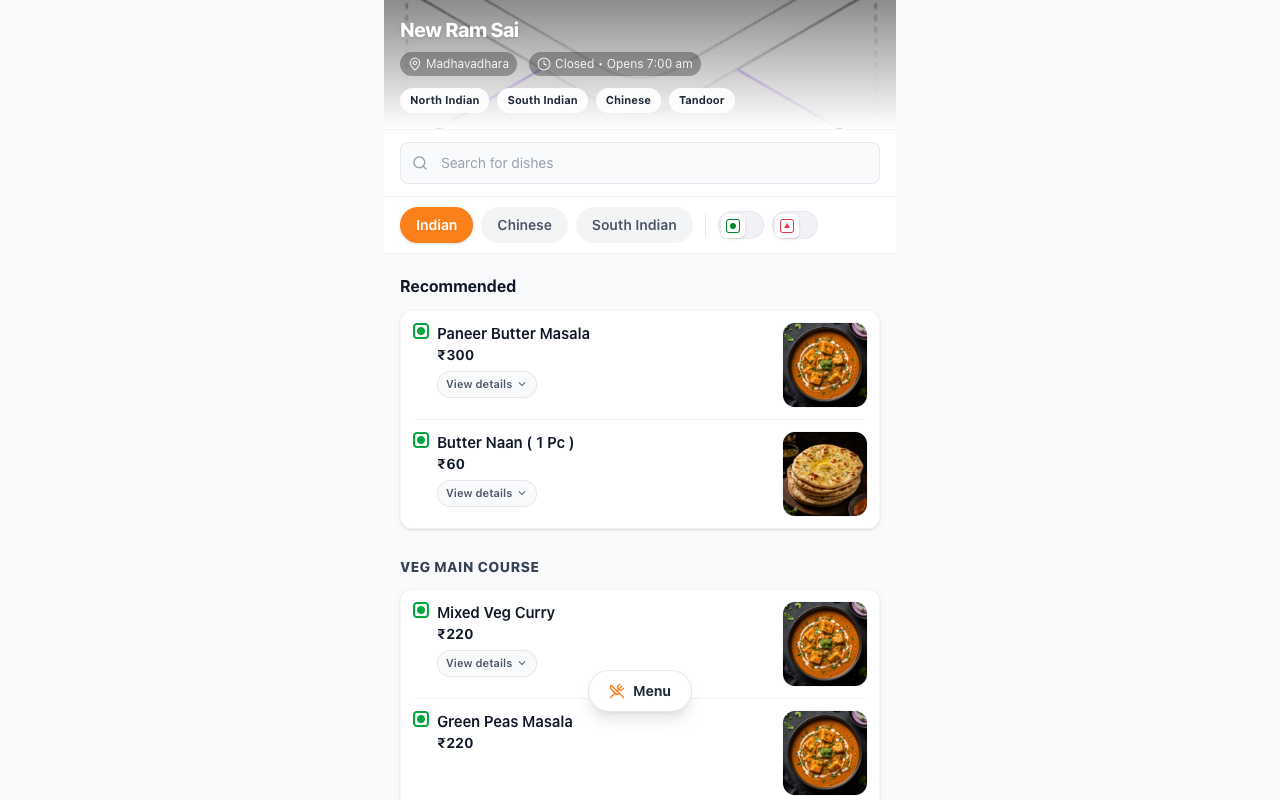
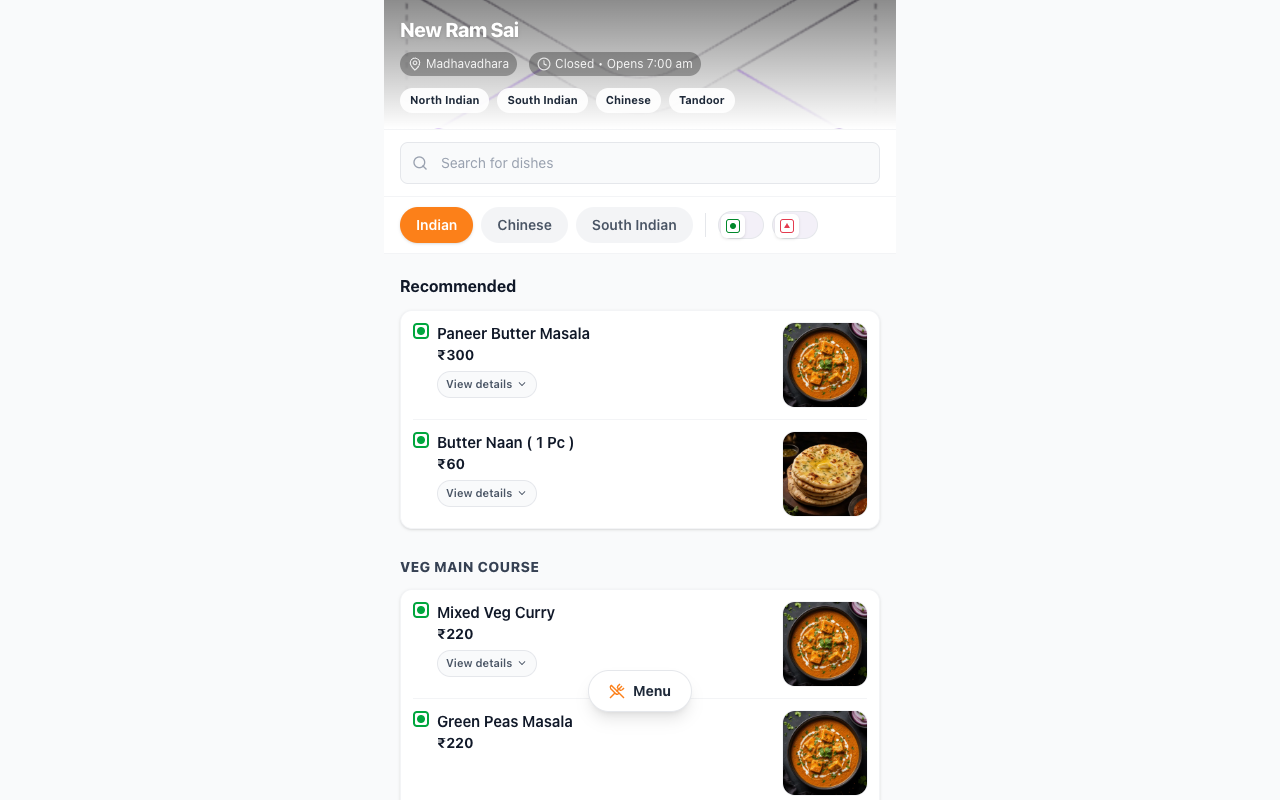
We delivered a complete QR menu product for New Ram Sai restaurant — not a static PDF, but a full mobile web application with Swiggy-inspired UX, structured menu data, cart workflow, item detail sheets, and production deployment on a custom subdomain.
Context
Restaurants replacing printed menus need more than a PDF or image gallery. Customers expect search, dietary filters, smooth category navigation, and a cart they can show staff — all loading instantly after scanning a table QR code, with no app store install.
Real-world scenario
A customer scans a table QR (`?table=12&mode=dine-in`), lands on a branded hero header, searches "biryani", filters veg-only, opens a dish bottom sheet with photo and description, adds items to cart, and shows the order summary to staff. Takeaway mode switches via the same app using URL params for future print QR variants.
Constraints
- Mobile-first Swiggy-style UX on low-end Android over restaurant Wi‑Fi
- 203 menu items across 32 sections — generated from structured JSON, not hand-maintained JSX
- WebP dish image pipeline with category fallbacks for missing photos
- Per-table and dine-in / takeaway / delivery modes via query params
- Single-tenant subdomain on shared GCP HTTPS load balancer
- Installable PWA shell — fast repeat visits for returning customers
What we built
- React 19 + Vite + Tailwind v4 SPA with sticky Indian / Chinese / Beverages category tabs
- Live search across all dishes; veg / non-veg / all diet toggle on every view
- Floating Menu button → sub-category jump modal with smooth scroll-to-section
- Item bottom sheet with dish photo, bestseller tags, spice level, and rich metadata
- Recommended (bestseller) section auto-built per active category
- Local cart context with bottom bar, drawer, quantity controls, and order summary
- Menu generation script (`generate-menu.mjs`) and image optimization pipeline for production assets
- Cloud Build → Cloud Run (`kaana-qr-menu`) with nginx static serving; route `newramsai.menu.kaana.in`
Architecture
- QR scan → HTTPS LB → Cloud Run (nginx + Vite build) → React SPA
- Structured `menuSections.json` → TypeScript menu model → filtered views by category, search, diet
- Cart state in React context — no backend required for MVP; staff confirm from customer screen
- Optional `?table=` and `?mode=` params for table labels and service mode without separate builds
Reliability & security
- Static SPA on Cloud Run — fast cold starts, no server-side session state
- Managed SSL via kaana-menu-cert on shared global load balancer
- Image manifest + optimize-dish-images pre-build keeps LCP acceptable on mobile
Outcomes
- Full menu product live at newramsai.menu.kaana.in — scan-to-order in one step
- 200+ dishes navigable with search, filters, and cart — matches consumer app expectations
- Same codebase supports dine-in table QR, takeaway, and future delivery entry points
- Menu updates ship via JSON regen + redeploy — no manual HTML edits
Technology stack
Frontend
Menu & assets
Infrastructure
FAQ
Does the QR menu require an app install?
No. It is a mobile web app — customers scan a QR code and browse in the browser.
How many menu items does it support?
The New Ram Sai deployment includes 200+ items across 32 categories with veg/non-veg filters and local cart.
Related services
For social · LinkedIn hook
A QR menu should feel like Swiggy, not a zoomed-in PDF.
- → Built: full QR menu app — 200+ items, search, veg filters, cart, item sheets
- → Live: newramsai.menu.kaana.in on GCP Cloud Run with table/mode QR params
- → Stack: React, Vite, Tailwind, structured menu JSON + image pipeline
Need a production QR menu — not a PDF — with cart, search, and your brand UX? We ship full hospitality web apps fast.
Discuss a similar project